Most senders wait too long. By the time the loud signals arrive, the damage already sits in your sender reputation.
Google’s ceiling for spam complaints is 0.30%, with 0.10% as the level to stay under [2].
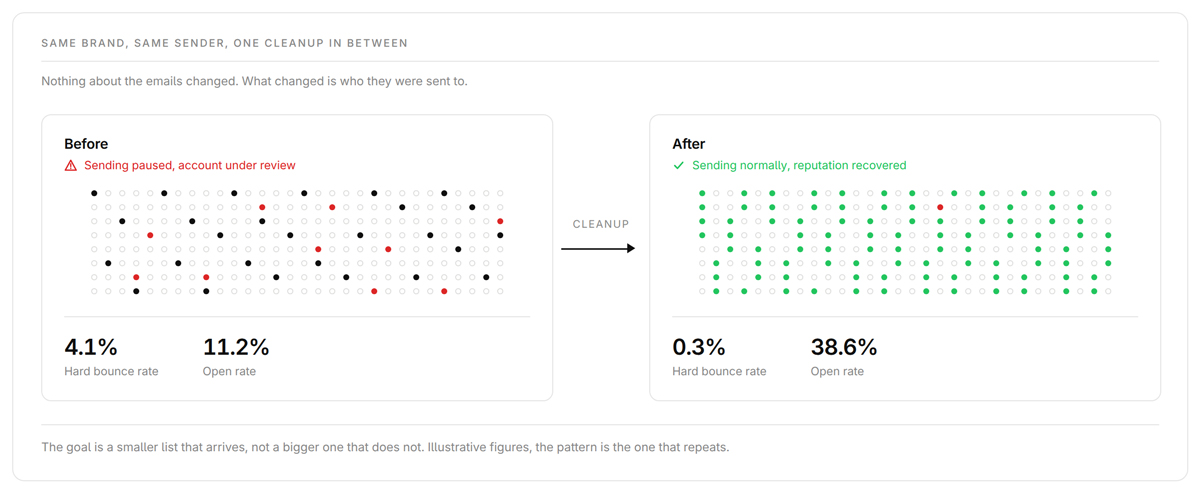
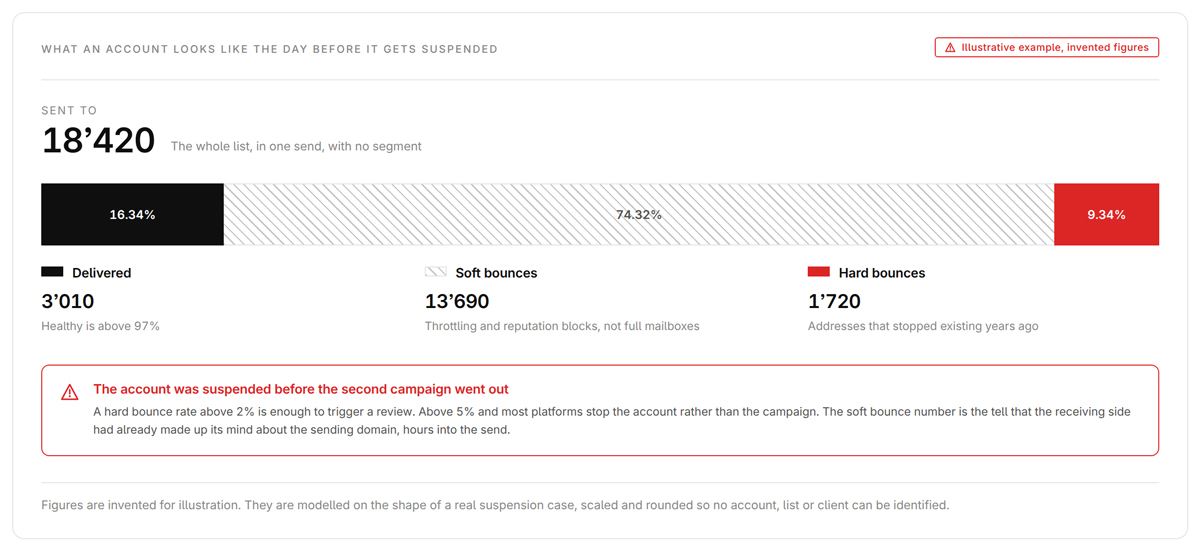
The invoice is the smallest part of it. The first cost is suspension risk. Brevo publishes its triggers, a hard bounce rate above 2%, an unsubscribe rate above 1% or a complaint rate above 0.2% on recent sends [5], and an old list clears the first of those on one campaign. That complaint trigger sits below Gmail’s own line, so your platform stops you before Google does. A paused account costs you every send planned that month.
The second cost is volume you pay for and nobody receives. Send 40’000 emails with 8’000 dead addresses in the file and you bought 8’000 sends of nothing.
The third is the one senders miss. Bounces and complaints from dead weight pull the whole sending domain down, so the subscribers who do want your email start finding it in spam. You are not losing the dormant contacts, you are losing the good ones.
Klaviyo and Mailchimp both stop charging once a contact is suppressed or marked cleaned [19]. Against any of that, cleaning is cheap, a few hundred francs to clean 50’000 contacts.
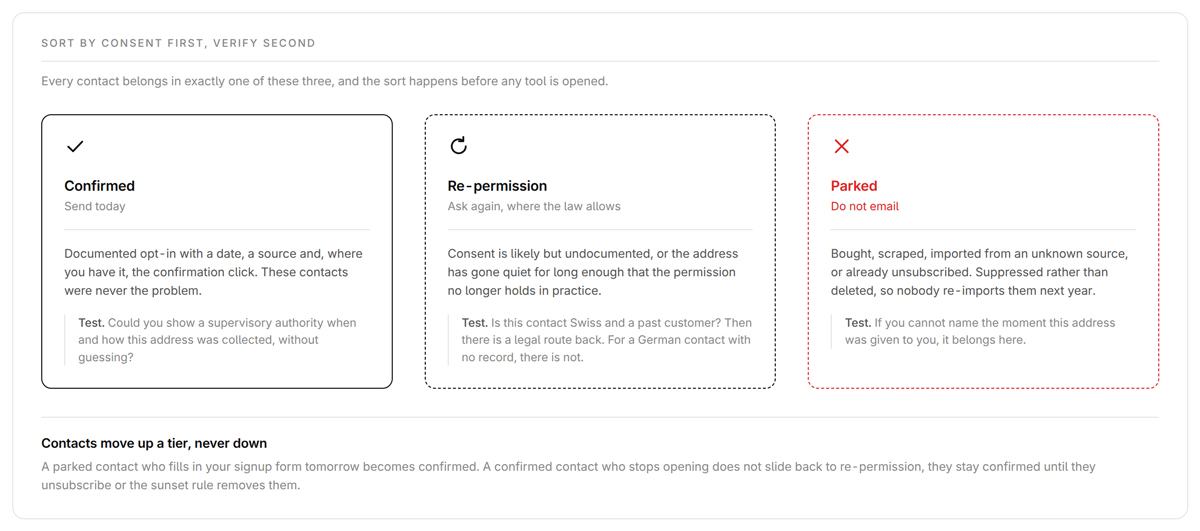
Before you touch a verifier, sort every contact into one of three buckets. This is what stops a re-permission email going to contacts you never had the right to email.
| 🟢 Confirmed | 🟡 Re-Permission | 🔴 Parked |
|---|
| Documented double opt-in | Engaged but consent is thin | No defensible consent |
| Send today | Ask to reconfirm* | Do not email |
| Keep in main list | Move to a separate flow | Suppress or delete |
Double opt-in means the subscriber confirmed the sign-up by clicking a link in a separate email. It is the standard proof of consent in both countries, and I went through the Swiss side in [
Double Opt-In in Switzerland].
Two jobs before anything else. Measure what is broken so you can prove recovery later, and remove the rows you would otherwise pay to verify twice.
Pull bounce rate split into hard and soft, complaint rate per campaign, open and click rates over time, unsubscribes and net list growth across the last three to six months. Screenshot it and note the date.
Then set a bounce rule, because most senders have one for hard bounces and none for soft. Hard bounces come out on the first, soft bounces after three consecutive ones to the same address. That matters because Swiss business mail on Infomaniak, Hostpoint and Microsoft 365 tenants soft bounces with greylisting and mailbox-full codes that clear on retry. I took over an account last year where the previous agency had removed every soft bounce as dead. Around a fifth would have delivered on a second attempt.
Deduplication comes next. Strip whitespace, lowercase the domain, merge records that share an address across imports, and for Gmail collapse dot variants and plus-addressing, because manuel+shop@gmail.com and manuel@gmail.com are one mailbox at Google and two rows in your database. That is Gmail-specific, not true of bluewin.ch or GMX. On merge, the oldest documented double opt-in wins.
💡 Tip At Lauvette our giveaway campaigns grew the list fast and left it messy. When we normalised the addresses, close to a tenth of the file was the same people entering twice. It is the cheapest step in the process and the only one that shrinks a contact-priced invoice the same day.
These are the segments you send to during warm-up in Step 8, so build them now. I use five bands. Active opened or clicked in the last 30 days, Recent in 30 to 90, Cool in 90 to 180, Cold in 180 to 365, Dormant not at all in over a year. Most contacts on the lists I get handed land in Cold or Dormant. That is what I see in audits, not a published figure.
Weight clicks above opens. Since iOS 15, Apple Mail Privacy Protection loads remote content through Apple’s proxy, so the pixel fires whether or not anyone read the email [24].
Verification tells you which addresses are still real. I use Bouncer, at USD 8 per 1’000 addresses on pay as you go [20]. Hosting is why I picked it, not accuracy. There is no credible independent accuracy benchmark, so I read every vendor’s hit-rate claim as marketing.
Email list cleaning tools compared
| Tool | | EU data residency and DPA | |
|---|
| | Yes, EU data centres, signed DPA, 60-day deletion [20] | |
| | | |
| | | |
| NeverBounce | | | |
| Kickbox | | | |
If EU residency is not a constraint, the three US tools are fine.
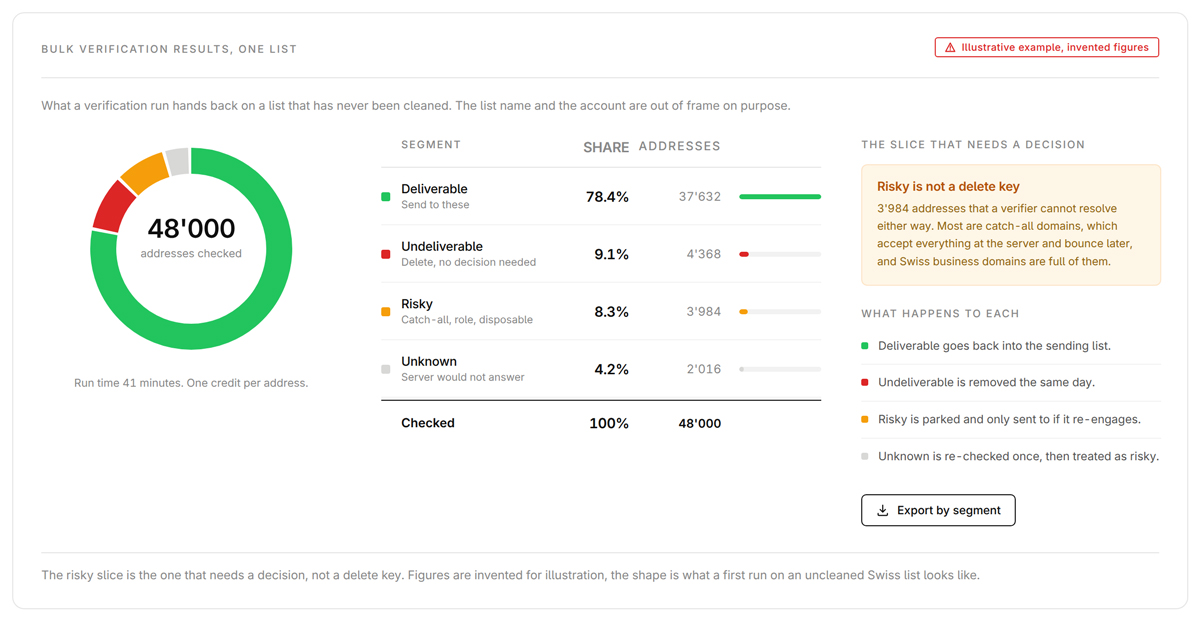
Undeliverable and disposable come out immediately, unknown gets one retry after 24 hours, and role addresses like info@ and sales@ get their own group, because complaints run higher there.
Three kinds of spam trap exist and they mean different things [17]. A pristine trap never belonged to a person, so hitting one says the list was bought or scraped, and it carries the highest blocklisting risk. A recycled trap is a once-real mailbox reclaimed by the provider after at least 12 months of inactivity, and role addresses often become one when the person behind them leaves. A typo trap is a misspelled domain, the only category a verifier catches reliably. This is why you verify before you re-engage and never after, because Validity names re-engagement sends to old lists as what surfaces the recycled ones [17].
Catch-all needs a decision. Such a domain accepts every address, so no verifier can confirm the mailbox behind it exists. ZeroBounce found 9% of addresses catch-all across the 11 billion it processed in 2025 [1], and on a Swiss B2B list expect more, because Swiss SME domains sit on tenants that accept everything by default.
⚠️ Watch out Do not delete catch-alls and do not send to them at full volume. Put them in their own segment, send in batches of a few hundred, watch that segment’s bounce rate, then promote or suppress on what comes back.
Verification tells you whether an address works. It says nothing about whether you are allowed to email it, and in Switzerland and Germany that second question is the one that costs money.
For every surviving contact, capture the source, the sign-up timestamp, the IP address if you have it, and the method, meaning single opt-in, double opt-in, offline collection or a purchase. If you cannot answer all four, the contact does not belong in the Confirmed tier. When someone challenges you, and in Germany someone eventually will, the consent record is the whole defence.
Most inherited databases also carry a bucket nobody names, people who submitted the form and never clicked the confirmation link. German practice treats that record as data whose purpose has lapsed under Art. 17(1)(a) GDPR, with roughly three weeks as a reasonable window [16], so delete it on an automated rule and never resend the confirmation months later.
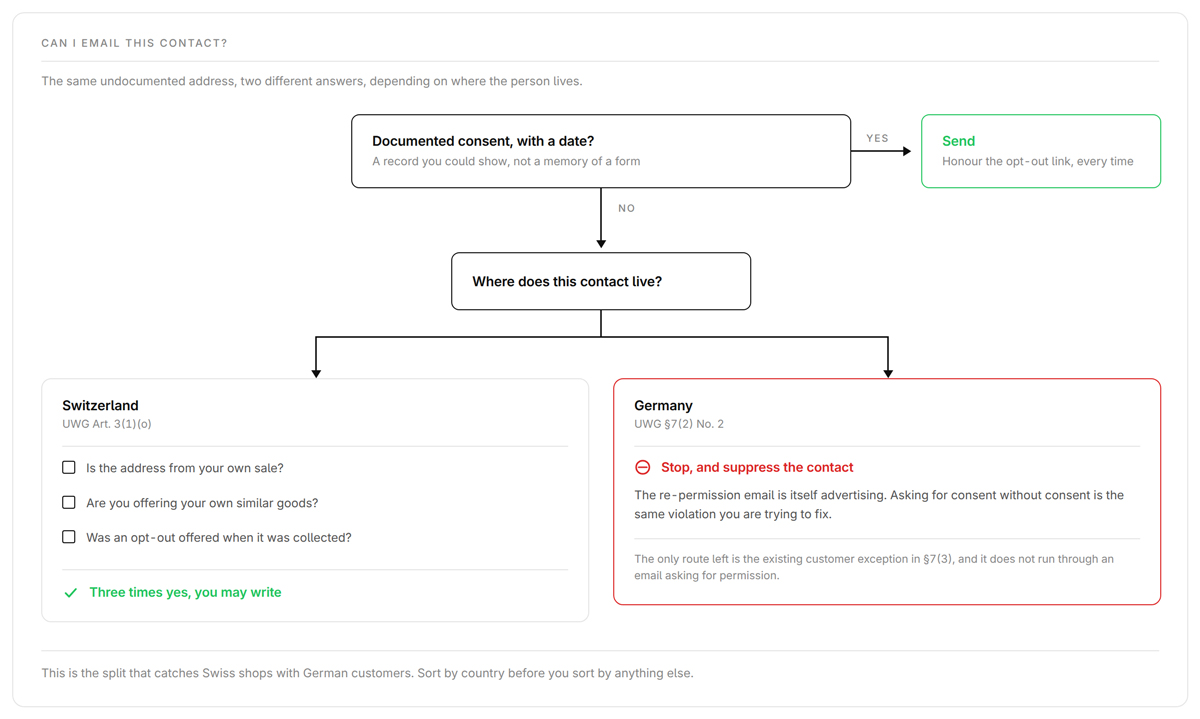
This is the step almost every English-language article skips. Both countries have a law called UWG, the Unfair Competition Act, and enforce it in opposite ways.
Switzerland’s UWG Art. 3(1)(o) makes it unlawful to send mass advertising by telecommunication without prior consent, without naming the correct sender, or without a free and easy way to refuse, and all three duties apply together [7]. The exception is narrow. If you got the address in your own sale and flagged the opt-out then, you may advertise your own similar goods without separate consent.
🇨🇭 Swiss rule Two corrections to what you will read almost everywhere else. Swiss law has no B2B carve-out for email [7]. And the Swiss self-regulator has held that automation, not recipient count, is what makes advertising a mass send [10], so anything leaving an email platform is Massenwerbung however few people receive it.
🇩🇪 German rule Germany’s §7(2)(2) UWG requires prior express consent for advertising by email, with no B2B exception either. §7(3) exempts existing customers only when four conditions hold together. The address came from a sale, the advertising covers your own similar goods, the customer has not objected, and the opt-out was flagged at collection and repeated in every message [22].
The rules are close. Enforcement is where the two countries come apart.
| | 🇨🇭 | 🇩🇪 |
|---|
| No Abmahnung system exists | An industry. §13(3) UWG makes you liable for the sender’s costs |
| Art. 23 UWG, criminal, only on complaint | Injunction plus costs, EUR 3’000 value in dispute per email |
| Up to CHF 250’000 on the individual, revDSG Arts. 60 to 64 | GDPR fines on the company |
Both money figures are widely reported wrong. The CHF 250’000 attaches to data protection duties under the revised Swiss data protection act (revDSG), not to spam, and it falls on the responsible natural person rather than the company, the reverse of GDPR [8]. The German EUR 3’000 is a Streitwert, the value in dispute used to calculate fees, set by KG Berlin for one unsolicited email [21], so a first warning costs a few hundred euros and a second send escalates.
Swiss enforcement is real but small. A 2019 Strafbefehl in Kanton Luzern covered 22 advertising emails to someone who had objected years earlier, and the penalty came to a CHF 250 fine, CHF 660 in costs and 15 suspended daily units [9]. An order of magnitude below German exposure.
Now the part that decides your German contacts. If one has no valid consent, you cannot email them to ask for it. The OLG München held that an email asking someone to confirm a newsletter sign-up is itself advertising and falls under the prohibition [11]. That is an appellate decision rather than settled BGH law and it is criticised in the German literature, so it is not beyond argument, but the risk is high enough that suppression is the right move.
One recent decision moves the line back your way. In November 2025 the ECJ held that giving an email address in exchange for a free digital service counts as obtaining it in the context of a sale, so the existing customer exception reaches further than most senders assumed [14]. Check whether §7(3) covers a contact before you park them as unmailable. What you do send there stays as bare as a password reset. LG Stendal held that a logo and a welcome line in a double opt-in confirmation made it unlawful advertising, and KG Berlin held the same of a two-line promotional footer on a legitimate business email [12].
One piece of good news. The BGH held in January 2025 that a single unsolicited email does not by itself found an Art. 82 GDPR damages claim, because the claimant has to show a real loss of control [13]. The injunction and the warning costs are untouched.
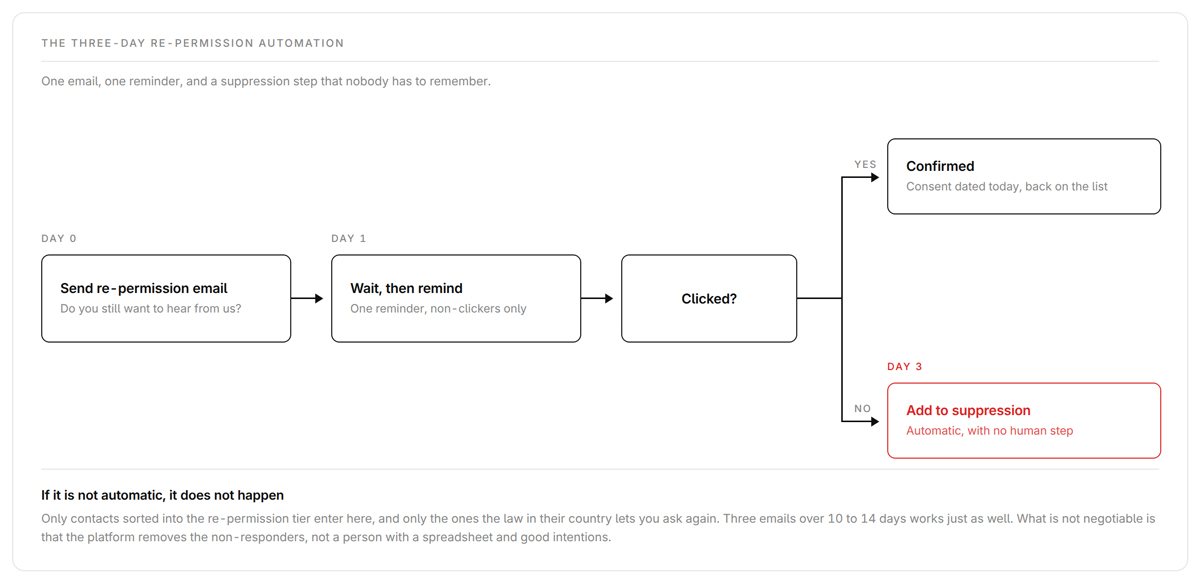
Once you know which contacts you may legally ask, the mechanics are deliberately boring.
| Day | What happens |
|---|
| Day 0 | Re-permission email asking whether they still want your emails |
| Day 1 | One reminder to anyone who has not clicked |
| Day 3 | Non-responders move to suppression automatically |
It works the same in Brevo, Klaviyo, ActiveCampaign and Mailchimp, and three emails over 10 to 14 days is fine too. What is not negotiable is that the automation suppresses non-responders, not somebody remembering.
There is no credible published benchmark for re-confirmation rates, so distrust any number quoted at you. A low response is not failure. The people who do not click were not buying either.
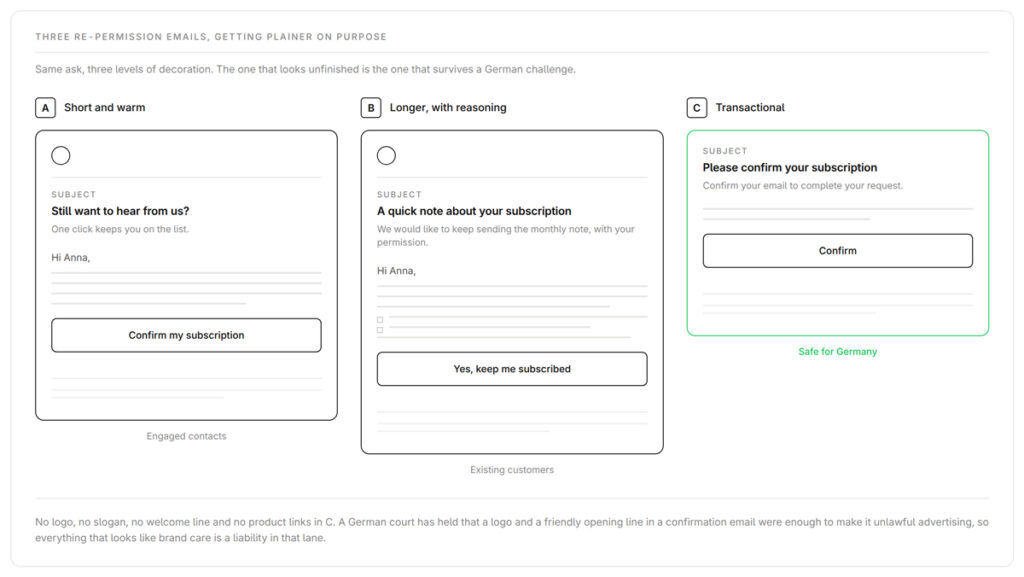
All three carry the same basics. Clear sender identity, a plain statement of purpose, one-click unsubscribe, a privacy notice link, and nothing promotional.
| | |
|---|
| Engaged contacts, thin consent record | Only where a consent basis exists |
B, longer, with reasoning | Customers you want to re-anchor | Only with a prior basis, value points informational |
| | The only style I would send |
🟢 Template A
Subject: Still want to hear from us? Preview: One quick click keeps you on the list.
Hi [First name],
We’re tidying up our list so we only email people who want to hear from us. If that’s you, click below and nothing changes. If we don’t hear back, we’ll quietly stop.
[Confirm my subscription]
[Company legal name, address] · [Privacy notice] · [Unsubscribe]
Subject: A quick note about your subscription Preview: We’d like to keep sending you [useful thing], with your permission.
Hi [First name],
You’re getting this because you [bought from us / signed up] a while ago. We take permission seriously, so we’re checking in.
Do nothing and you’ll come off the marketing list automatically.
[Yes, keep me subscribed]
[Company legal name, address] · [Privacy notice] · [Unsubscribe]
Subject: Please confirm your subscription Preview: Confirm your email to complete your request.
Please confirm you want to receive emails from [Company] by clicking below.
[Confirm]
[Company legal name, address] · [Privacy notice] · [Unsubscribe]
Nothing else in C. No logo, no slogan, no welcome line, no product links [12].
Here is a mistake I have watched more than once. Clean the list, then send full volume from a quiet domain, and providers read the jump as a spammer.
Ramp instead. Week 1 goes to the most engaged 25% of the cleaned list, week 2 to 50%, week 3 to 75%, week 4 to everyone. Keep bounces under 2%, complaints under 0.1% and the pattern steady.
Fix the authentication while you ramp. Since 5 May 2025 Microsoft requires SPF, DKIM and DMARC, the three email authentication records, from anyone sending 5’000 or more messages a day to outlook.com, hotmail.com and live.com. Non-compliant mail goes to Junk, and Microsoft says outright rejection is coming without naming a date [4]. Gmail and Yahoo have required the same since February 2024 [2]. Start DMARC at p=none, read the reports, then move to p=quarantine and p=reject.
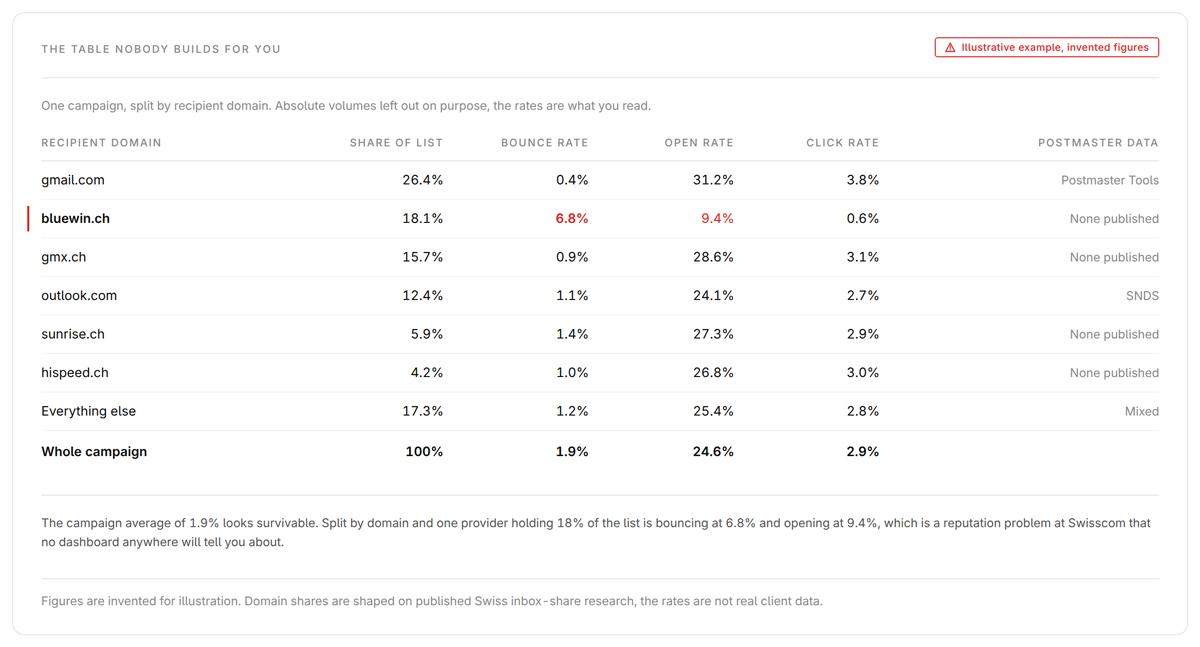
Every article on this topic tells you to watch Google Postmaster Tools. For a Swiss list that leaves most of your recipients invisible, and it is the biggest single reason a US-written cleanup process misfires here.
📊 Quick fact In German-speaking Switzerland, Gmail is 26% of consumer inboxes. Bluewin (Swisscom) is 18.5%, GMX.ch 16.1%, Microsoft 12.9% and Sunrise 5.6% [6]. Bluewin, GMX.ch and Sunrise together are around 40% and none of them publish a postmaster dashboard.
Two caveats. The survey is from 2022 and was commissioned by United Internet Media, which owns GMX. The direction holds even if the shares have moved.
So Swiss measurement has to be built rather than looked up. Google covers roughly a quarter of your list, Microsoft’s SNDS deliverability dashboard another eighth, and for the rest you split your own bounce and engagement data by recipient domain, bluewin.ch, gmx.ch, hispeed.ch, sunrise.ch and bluemail.ch, then watch those columns individually. A reputation problem at Swisscom shows up in your own data or it does not show up at all.
Two notes on the dashboards you do have. Google is retiring the Domain and IP Reputation views in the old Postmaster Tools interface, with no date published [3]. And Yahoo’s Sender Hub counts only inbox-delivered messages in its complaint rate denominator, which is why its number reads higher than your platform’s [23].
At the 23% annual decay rate ZeroBounce measured across 11 billion addresses in 2025, a 50’000-contact list loses roughly 2’800 a quarter [1].
My rule is that cadence follows send frequency, not list size. Send weekly and quarterly verification is enough, because your own bounce log warns you early. Send monthly or less and you learn about decay four times slower, so verify before every second campaign.
The other half is prevention. Put a verification call on the signup form so typo domains like gmial.com and blueiwn.ch never enter the list. Add honeypot fields and a bot check. Before someone reaches the unsubscribe confirmation, offer a smaller option. Monthly instead of weekly, or one topic instead of all of them. A downgraded subscriber is still a subscriber, and the ones who cannot find that option reach for the spam button. Then set a sunset policy so inactive contacts leave on their own. Only 24% of senders run one [18].
The sunset window follows the same logic, plus your buying cycle. Daily senders sunset at 60 to 90 days without engagement, weekly senders at 90 to 180, monthly or less at 180 to 365. Build three exceptions into the automation or it will suppress good customers. Someone who bought last month is busy, not disengaged, so extend their window. High-value and enterprise accounts get a human decision, never the rule. And known seasonality is not disengagement, because a Swiss ski shop’s customers go quiet every July.
When someone unsubscribes, hard bounces or ignores a re-permission email, do not delete them. Suppress them. Deletion loses the proof that you honoured the opt-out and lets the same address walk back in through the next import.
In Germany this is what the supervisory authorities expect. The Datenschutzkonferenz states that advertising suppression files are permitted under Art. 21(3), Art. 17(3)(b) and Art. 6(1)(f) GDPR [15]. Switzerland has no equivalent guidance and I would rather tell you that than invent one. Art. 6(4) of the revised DSG requires data to be destroyed once it is no longer needed, but honouring the objection is itself an ongoing purpose, and Art. 31 justifies it by overriding private interest. Keep the record minimal, the address and the opt-out date.
A suppression list is not a per-campaign exclusion. It is global across every campaign, workflow and tool you send from, and the only route out is the person opting back in themselves.
The order changes when the account is already paused, and panic-cleaning makes it worse. Send nothing, tests and apology emails included. Read the notice and work out what triggered it, because a bounce problem and a complaint problem need different fixes. Verify the whole list, then rebuild from the most engaged 10 to 20% in sends of 500, then 1’000, then 2’500. Domain reputation is slow to repair, so plan in weeks rather than days.
Some lists do not need this. Skip it if you are under 1’000 contacts and everyone engages, if the list is under six months old, or if bounces already sit under 1% and complaints under 0.05%. Skip it mid-launch too, and come back after.
Inherited a mess, or watched your open rates fall for a year without knowing why? This is what we do at sakto. We run the diagnosis, the verification, the jurisdiction split, the re-permission build and the warm-up, so you come out with a smaller, healthier list that reaches Swiss inboxes and stands up legally in both countries.
sakto is a Swiss email marketing agency, Brevo-first, built for e-commerce and B2B senders who want their email to work and stay on the right side of Swiss and German law.
[1] ZeroBounce, Email List Decay Report 2026 (zerobounce.net/email-list-decay) · [2] Google, Email sender guidelines (support.google.com/a/answer/81126) · [3] Google, Deprecation of the old Postmaster Tools interface (support.google.com/a/answer/16594218) · [4] Microsoft Defender for Office 365 blog, Outlook requirements for high-volume senders, effective 5 May 2025 · [5] Brevo Help Center, Why have my account or email campaigns been suspended? · [6] MindTake Research for United Internet Media, survey of 1’010 online users in German-speaking Switzerland, 24 August 2022 · [7] Swiss UWG Art. 3(1)(o), Fedlex SR 241 · [8] revDSG Arts. 60 to 64, in force 1 September 2023, EDÖB guidance on the criminal provisions, and Art. 23 UWG · [9] Kanton Luzern Strafbefehl, reported by Steiger Legal, 16 July 2019 · [10] Schweizerische Lauterkeitskommission, decision Nr. 172/20 · [11] OLG München, 29 U 1682/12, 27 September 2012 · [12] LG Stendal, 22 S 87/20, 12 May 2021, and KG Berlin, 5 U 35/20, 15 September 2021 · [13] BGH, VI ZR 109/23, 28 January 2025 · [14] ECJ, C-654/23 Inteligo Media SA v ANSPDCP, 13 November 2025 · [15] Datenschutzkonferenz, Orientierungshilfe Direktwerbung, section 5.1 · [16] IT-Recht Kanzlei on deletion of unconfirmed double opt-in records, Art. 17(1)(a) GDPR · [17] Validity, Spam Traps: What They Are and How to Avoid Them, updated 29 October 2025 · [18] Sinch Mailgun, State of Email Deliverability 2025, survey of more than 1’100 senders · [19] Klaviyo Help Center, Understanding active profile management, and Mailchimp, About cleaned contacts · [20] Bouncer, GDPR and pricing pages (usebouncer.com/gdpr, /pricing) · [21] KG Berlin, 5 W 6/23, 20 June 2023 · [22] §7 UWG (dejure.org) · [23] Yahoo, Introducing Insights, Postmaster @ Yahoo blog, and Spam Resource, 19 October 2025 · [24] Apple support article 102289, Mail Privacy Protection
*This article is general information, not legal advice. Swiss and German email law is fact-specific. Check with a qualified specialist before acting.*